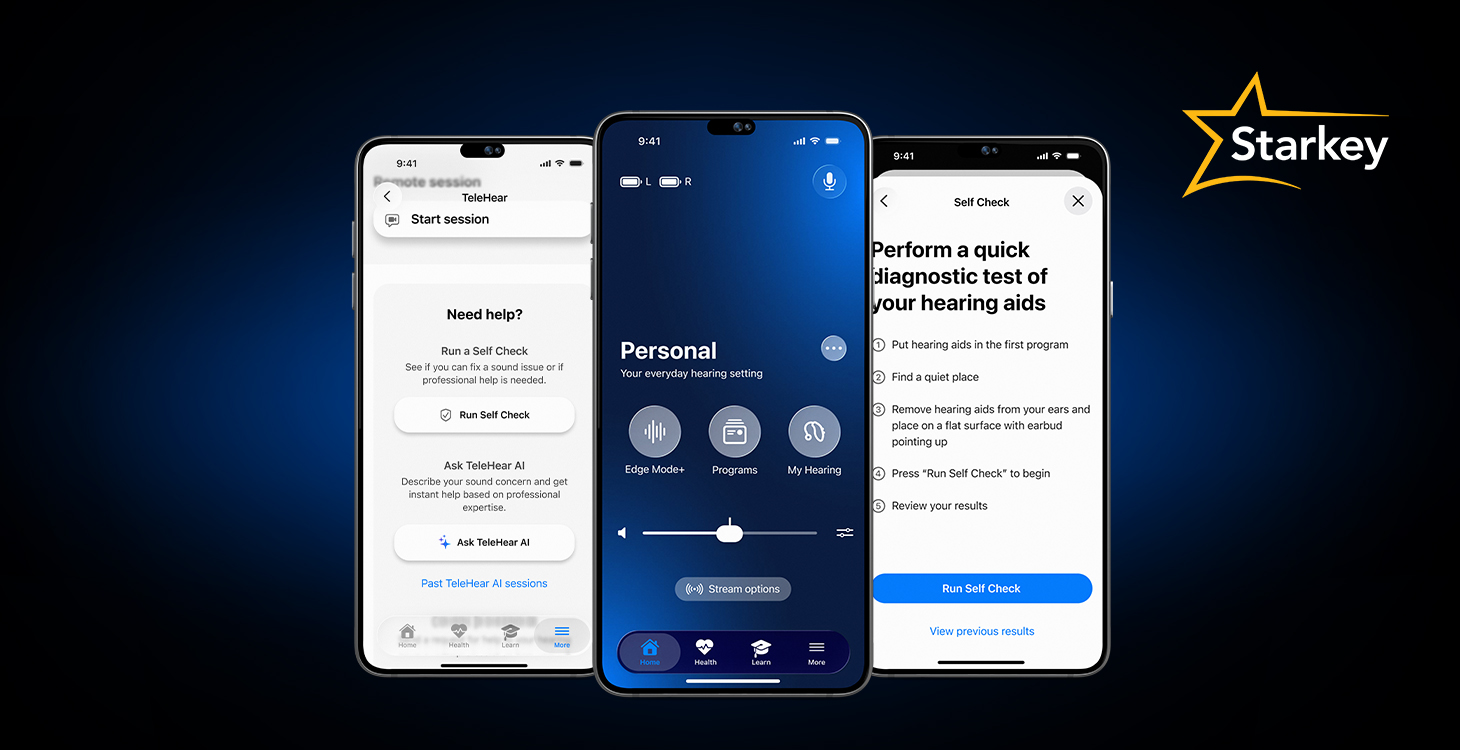
Hearing aids sounding a little off? Need a simple tweak to a program? Whether you’re navigating the effects of earwax buildup or the need for a quick sound adjustment for the environment you’re in, you now have the power to solve many hearing aid maintenance or sound issues yourself—with help from the My Starkey app.
Let’s explore 3 top troubleshooting solutions brought to you by My Starkey app features.
(Don’t have the My Starkey app yet? No problem – you can download for Apple here and Android here, and view the easy setup steps, here.)
1. Easily test hearing aid components for issues with Self Check
The Self Check feature in the My Starkey app gives you the ability to perform a simple, do-it-yourself test on your hearing aids’ electronic components—the microphone, receiver, and circuit (or the “brains” of the hearing aid). In just a few taps, you can examine these parts for buildup of earwax or other debris, which can interfere with the sound quality of your hearing technology.
Simply run Self Check each month—or sooner if you feel your hearing aids aren’t working optimally. Within minutes, you’ll know if:
- Your hearing aids are in good working condition
- Specific component(s) need cleaning
- Wax guard(s) need changing
- You should seek help from a hearing care professional
How Self Check works
Running Self Check is as easy as placing your hearing aids on a flat surface in a quiet environment (earbuds face-up); running Self Check with the tap of a button; and reviewing the results.
The results screen is notably user-friendly, utilizing symbols to show the working state of each electronic component (receiver, microphone, and circuit) within your right and left hearing aids:
- Green “√” (checkmark): Your hearing aid’s performance is normal. No action needed.
- Yellow “!” (exclamation point): Your hearing aid needs attention or cleaning.
- Red “X” (letter): Your hearing care professional is needed for hearing aid cleaning or repair.
Benefits of using Self Check
Adding Self Check as an ongoing step to your hearing aid maintenance routine helps you save time by resolving potential issues yourself—without the extra trip to your hearing care professional. Discovering earwax/dirt/oil buildup or internal processing issues now can also help you avoid more complex quality issues in the future.
At the end of the day, Self Check helps you extend the life of your hearing aids by keeping them in working order. Can’t beat that.

2. Get sound adjustments right when you need them with TeleHear AI
TeleHear AI is an intelligent tool that harnesses the power of cutting-edge Generative AI (or Gen AI) to help you solve sound concerns independently.
For example: Your hearing care professional may set up a program for a certain listening situation you often encounter. But listening situations can be dynamic—changing at any time for various reasons. Maybe your favorite café has more background noise than usual, or your regular office meeting now includes more guests than before. Situations like these can sometimes prompt the need for a sound adjustment.
This is where TeleHear AI can help—extending the reach of professional expertise to help you hear better in real time.
How TeleHear AI works
Simply say or type out your sound issue to TeleHear AI. After discussing it with you in detail via chat screen (don’t worry—TeleHear AI even offers sound issue examples if you need help explaining yours), TeleHear AI will create an instant sound adjustment for you to try with your hearing aids, based on the thousands of hearing professional fittings it was trained on.
With a few taps, you can try the sound adjustment plus compare it with your current program setting to be sure. If you like the sound adjustment, apply it to your program instantly. Or if it needs a tweak, simply ask TeleHear AI for a new adjustment to try, and it will deliver.
Remember, you can always return to your original program setting at any time or opt to connect with your hearing care professional. With TeleHear AI, the control is in your hands.
Benefits of using TeleHear AI
Independently resolving common sound concerns can, like Self Check, save you time and stress by getting the hearing assistance or answers you need, right when you need them. With such an instant, convenient solution—that’s what we call unstoppable hearing.
3. Learn section empowers you with knowledge and solutions
Whether need a quick refresher on hearing aid maintenance or on-the-spot help using an app feature, the Learn section is here for you—offering a complete library of “how-to” videos, tutorials, and articles at your fingertips. Topics include care and maintenance, advice and tips, hearing aid usage, battery and power, and more.
New to changing wax guards? There’s a quick lesson and how-to-video for that. Ever lose your hearing aids? Watch or read how to use the “Find My Hearing Aids” app feature so you’ll find them quickly when/if the time comes. The list goes on and on
How Learn works
There are several different ways you can utilize the Learn section to your advantage:
- Search for what you want from the search bar or by popular topics
- Set it so you receive Learn content on the home screen that is tailored directly to where you are on your hearing aid journey.
- Explore overviews and step-by-step guidance on every app feature with access to a full, searchable user guide.
Benefits of using the Learn section
Knowledge is power over your hearing journey—and the Learn section meets you where you’re at with hearing aid guidance and solutions. And while you’re still welcome to keep your hearing care professional on speed dial, you won’t need to as much since Learn is an invaluable tool for being proactive and problem-solving on demand.

Bottom line—My Starkey is your solution
Once you experience how well hearing aids keep you connected to the world and the people you love, you realize the importance of regular maintenance; the benefits of having full control over your hearing aids; and the confidence that comes with knowing how to make the very most of them.
And with My Starkey, you’ll always have the troubleshooting, maintenance, and guidance you need—in the palm of your hand.